
Easy Line Remote
Sonova AGMedical
4.4784.00 Reviews
- Version
- 7.5.1
- Installs
- 100.00K
- Age Rating
- Everyone
Screenshots
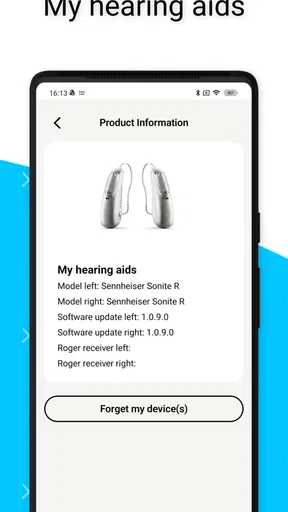
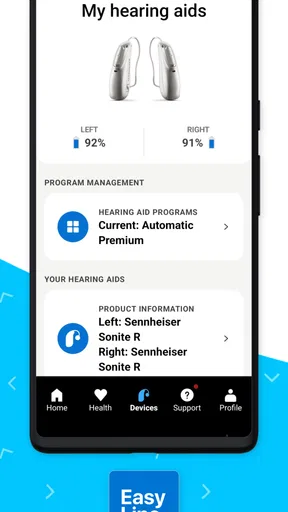
Our Review of Easy Line Remote
 Analysis by Appyee
Easy Line Remote is the kind of medical app I would recommend only after answering one important question: do you use compatible hearing equipment from Sonova AG? If the answer is yes, this free companion app can make everyday adjustments feel much less awkward than reaching for the physical controls or asking someone else to help. If the answer is no, it is not a general hearing test or a universal sound-enhancement tool, so downloading it will probably not lead to a useful experience.
After spending time with it, my overall view is positive but practical. The app is not trying to replace professional hearing care, and it does not turn a phone into a complete hearing-aid system. Its value comes from giving supported users a more convenient way to interact with their hearing setup while also presenting health-related information in the same place. Its best quality is control without fuss: when it works with your equipment, small changes can be made more privately and with less interruption.
What Easy Line Remote is really useful for
Easy Line Remote belongs in the medical category, but I found it easier to understand as a daily companion rather than a standalone medical solution. The developer, Sonova AG, positions it around a personalized hearing experience and health data tracking. In practical terms, that means the app is most relevant when you already have supported hearing devices and want a simpler bridge between those devices, your phone, and your routine.
The first thing I would do after installing it is treat setup as part of the decision, not as a quick formality. A remote-control app is only worthwhile when the phone can communicate properly with the hearing equipment. Before relying on it outside the home, I would pair everything in a quiet room, check that the intended controls respond, and make sure the hearing devices themselves are charged. That short test prevents the most frustrating scenario: discovering during a conversation that the app is not connected when you need it.
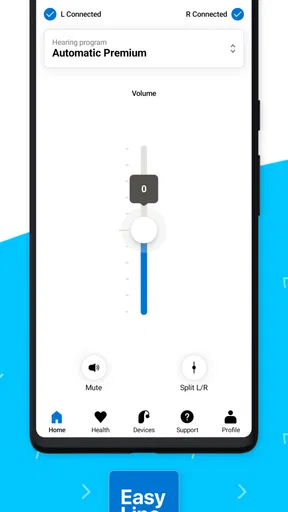
Once configured, the appeal is straightforward. Instead of handling tiny buttons or trying to remember which physical control changes what, I can use the phone interface as a more visible point of interaction. This is especially helpful for people who find small controls difficult to operate, who prefer not to touch their ears in public, or who want a clearer sense of what they are changing.
That convenience matters in ordinary moments. Imagine sitting in a café where background noise gradually becomes tiring. A physical hearing-device control may be hard to identify by touch, and repeatedly asking a companion to help can feel uncomfortable. With a compatible setup, Easy Line Remote gives the user a more discreet route to make an adjustment. I would still avoid changing settings constantly; the better habit is to make one small change, listen for a moment, and return to the previous setting if the result is worse.
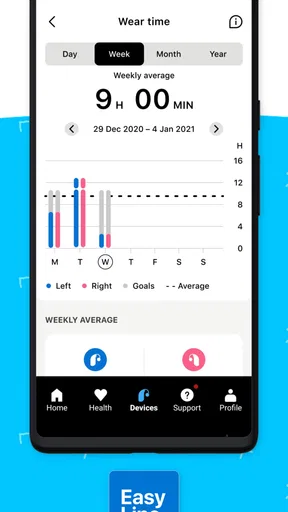
The health-data side adds a different kind of value. Rather than treating hearing as an isolated device problem, the app can help users pay attention to patterns connected with their daily use. I see this as most useful for building a conversation with a hearing professional. A record is not a diagnosis, but it can help a user explain how consistently they wear the devices, when listening feels difficult, or whether a change in routine seems to affect their experience.
That distinction is important. I would not use the app’s health information as a reason to self-diagnose, alter treatment, or ignore symptoms such as sudden hearing changes, pain, dizziness, or persistent discomfort. Those situations call for qualified medical advice. The app can support awareness; it should not be mistaken for a clinician.
The strongest part is the everyday control
Many hearing-related apps become confusing because they expose too many technical choices at once. Easy Line Remote is more useful when approached as a practical remote rather than as a laboratory dashboard. The advantage is not that it makes every situation perfect. The advantage is that it can reduce the number of physical steps between noticing a problem and trying a reasonable adjustment.
I also appreciate the privacy angle. A person who is new to hearing devices may already feel self-conscious about managing them in front of other people. A phone is familiar and socially ordinary, so using it can feel less conspicuous than reaching behind the ear or handling a small accessory. That does not make the app essential, but it can make consistent use easier, and consistency is often more valuable than an impressive collection of rarely used options.
Another useful workflow is to use the app as a preparation tool before entering a demanding environment. I would check the connection at home, confirm that the devices respond, and then leave the settings alone unless the surroundings genuinely require a change. In a busy place, the goal should be reducing distraction, not spending the entire time navigating menus. This approach also protects battery life on both the phone and hearing equipment, even though the app cannot compensate for a device that is already running low.
For family members or caregivers, the app may also reduce the need to handle the user’s equipment directly. That can preserve independence for someone who is comfortable using a smartphone but struggles with very small controls. I would introduce it gradually, though. A user who is not confident with phones may find a physical control easier than a screen, especially when there is urgency. The right choice depends on the person, not on the app’s feature list.
Where the experience can become less comfortable
The main limitation is also the most obvious one: Easy Line Remote depends on compatibility and a reliable connection with supported hearing equipment. That makes it a companion, not a universal hearing utility. People looking for a general hearing screening, a way to amplify any sound through any pair of headphones, or a replacement for professional fitting should choose a different kind of product.
Phone-based control introduces its own points of friction. The phone must be nearby, usable, and sufficiently charged. A screen can be harder to operate in bright sunlight, with wet hands, or while wearing gloves. If the user’s phone is being used for a call, navigation, or another demanding task, switching back to the hearing app may not feel effortless. These are not failures unique to this product, but they are real trade-offs compared with a dedicated physical control.
Bluetooth-style connections and device pairing can also be less predictable than a user expects. I would not assume that installing the app means everything is ready. If a setting does not respond, I would first check whether the hearing devices are powered on, whether the phone is connected to the correct equipment, and whether the app has been updated. Restarting the connection may solve a temporary problem, but repeated failures are a reason to contact the hearing provider rather than endlessly changing phone settings.
There is a second, quieter weakness: an app can make users believe that every listening difficulty is a setting problem. Sometimes the issue is a poor fit, an ear blockage, a damaged component, an unsuitable program, or a change in hearing ability. If the same environment remains difficult after sensible adjustments, I would stop experimenting and arrange professional support. More control is not the same as better hearing care.
The health tracking deserves the same caution. I like the idea of having useful information available, but tracking can become noise if the user checks it without a clear purpose. My suggestion is to review patterns at a sensible interval and note specific situations that matter, such as difficulty during group conversations or fatigue after noisy outings. That produces a more useful discussion than repeatedly opening the app just to watch a number or status change.
How it compares with the usual alternatives
The closest alternative is often the physical control built into the hearing devices. That option wins for speed, independence from the phone, and reliability when the user already knows the controls by touch. Easy Line Remote wins when the user wants a clearer interface, more discreet operation, or a way to avoid manipulating small hardware. I would keep both methods available rather than treating the app as a replacement.
A dedicated remote accessory can be better for someone who does not want to use a smartphone or who needs a simple device reserved for hearing control. On the other hand, a phone app is easier to carry because the phone is already part of daily life. The choice comes down to confidence, eyesight, dexterity, and how often the user needs adjustments.
General hearing-test and sound-amplification apps serve a different purpose. They may be useful for preliminary awareness or casual experimentation, but they do not offer the same relationship with compatible hearing equipment. I would not compare Easy Line Remote with those tools as if they were interchangeable. If the goal is to understand a possible hearing problem, speak with a professional. If the goal is to manage supported devices more conveniently, this app is the more relevant category.
Professional fitting remains the stronger option when settings are consistently uncomfortable or ineffective. A clinician can evaluate the broader situation in a way that a remote interface cannot. Easy Line Remote is most valuable between appointments, when the user needs practical control and a clearer record of everyday experience, not when a fundamental adjustment is required.
Who should use it and who should skip it
I think the best audience is someone who already uses compatible hearing equipment, owns a reasonably current smartphone, and wants more independence during ordinary activities. It is especially appealing to users who dislike tiny physical buttons, want discreet adjustments, or would benefit from keeping hearing-related information alongside their other phone tools.
It can also suit a family member helping an older relative get comfortable with hearing devices. I would set it up together, write down the basic steps in plain language, and practice in a quiet room before trying it in a restaurant or at a family gathering. The aim is not to teach every possible function. It is to make the few important tasks—checking the connection, making a modest adjustment, and returning to a familiar setting—feel routine.
I would skip it if you do not have supported hearing equipment, if you strongly dislike managing health tools on a phone, or if you expect an app to diagnose hearing loss. I would also hesitate to recommend making it the only control method for someone who is uncomfortable with touchscreens or who may be unable to access a phone during an important conversation. In that case, a physical control or dedicated accessory may be a better fit.
The age rating is Everyone, which matches the app’s role as a practical health companion rather than an entertainment product. Still, an age rating does not determine whether the interface is comfortable for every person. Older users may need help with setup, screen visibility, and connection troubleshooting. That is a usability consideration, not a reason to dismiss the app.
Version, availability, and the decision to install
Easy Line Remote is free, and its current version is 7.5.1. It was released on July 11, 2019, and the app requires operating system version 10 or later. Those details make it sensible to check the phone’s software before planning a setup session. I would also update the phone and the app before pairing, because troubleshooting an old installation can create confusion that looks like a compatibility problem.
The app has built a visible user base, with over one hundred thousand installs, a 4.4 average from around five thousand ratings, and 784 reviews. I treat those figures as encouraging rather than conclusive. A remote app can work extremely well with one supported hearing setup and be irrelevant to someone with different equipment. The important question is not popularity alone but whether your devices are supported and whether the control style matches your habits.
For a first setup, I would use this sequence:
Charge and switch on the hearing devices before opening the app.
Keep the phone close and complete pairing in a quiet, unhurried place.
Test one control at a time instead of changing several settings together.
Try the connection again after briefly leaving and returning to the app.
Practice returning to a familiar setting before using the app in public.
This workflow is more valuable than immediately exploring every screen. It gives the user a dependable fallback and makes it easier to tell whether a later problem comes from the phone, the connection, or the hearing equipment itself.
My final recommendation
I see Easy Line Remote as a useful, focused companion rather than a complete hearing solution. Sonova AG has created something that can make supported hearing devices less intimidating and more manageable in daily life, particularly for people who prefer a visible phone interface to small physical controls. The health-data element can add context, provided it is used to support conversations with professionals rather than replace them.
My recommendation is clear: install it if you use compatible equipment and want discreet control, easier routine management, or a more organized view of your hearing-related experience. Give it a proper setup test and keep the physical controls as a backup. Choose another option if you need a hearing test, universal amplification, diagnosis, or a phone-free solution.
In my experience, the app earns its place not through dramatic promises but through small moments of independence. When the connection is stable and the user understands its limits, those small moments can make conversations, errands, and social situations feel more manageable. For compatible hearing-device users, Easy Line Remote is worth trying; for everyone else, it is simply the wrong tool for the job.
Verdict
Strengths of Easy Line Remote
- Simple remote control setup for compatible Easy Line hearing aids.
- Adjusts volume and programs without reaching for the hearing aids.
- Clean, accessible interface suited to everyday use.
- Useful for discreet changes in noisy or changing environments.
- Available on mobile devices for convenient control on the go.
Limitations of Easy Line Remote
- Works only with supported Easy Line hearing aid models.
- Bluetooth pairing can be unreliable on some phones.
- Requires hearing aids and phone to remain within wireless range.
- Some features may vary by operating system or device generation.
- May increase phone battery usage during extended sessions.
Other Releases by Sonova AG
View All
myPhonak
Medical4.5
Similar Picks in This Category
View All
WebMD: Symptom Checker
WebMD, LLC4.1

Microphone Amplifier
DOSA Apps4.2

Anatomy Learning - 3D Anatomy
3D Medical OU4.5

Period Tracker and Calendar
SimpleInnovation4.9

GoodRx: Prescription Coupons
GoodRx4.8

CVS Health
CVS Pharmacy4.5
Frequently Asked Questions
What is Easy Line Remote, and what is it used for?
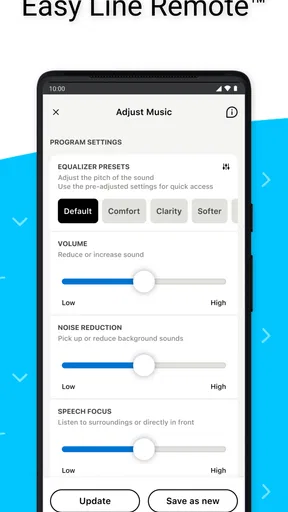
Easy Line Remote is a companion app designed for compatible hearing aids from the Easy Line range. After pairing the hearing aids with a supported smartphone, you can use the app to adjust volume, change listening programs, check battery information, and access other available controls. Its exact features depend on the hearing-aid model, firmware, phone, and operating system.
Which hearing aids and smartphones are compatible with Easy Line Remote?
Compatibility is not identical across every Easy Line hearing aid or mobile device. Before downloading, check the app listing and the manufacturer’s compatibility information for your specific hearing-aid model, Android or iPhone version, and Bluetooth requirements. Some functions may work only on newer devices, while older phones or hearing aids may support basic controls but not the complete feature set.
How do I connect my hearing aids to Easy Line Remote?
First, install the app, enable Bluetooth, and make sure the hearing aids are switched on and close to the phone. Follow the in-app pairing instructions, which may require placing the devices in their charger and removing them again to activate pairing mode. Grant the requested permissions, then test the connection. If pairing fails, restart Bluetooth and both the phone and hearing aids.
Can Easy Line Remote replace a hearing-care professional or hearing-aid adjustment?
No. Easy Line Remote is intended for everyday control and convenience, such as changing listening programs or making small volume adjustments. It does not replace a hearing evaluation, professional fitting, medical advice, or maintenance from an audiologist or hearing-care provider. If sound quality changes suddenly, one hearing aid stops working, or discomfort occurs, contact a qualified professional rather than relying only on the app.
Does Easy Line Remote work without an internet connection, and does it collect personal data?
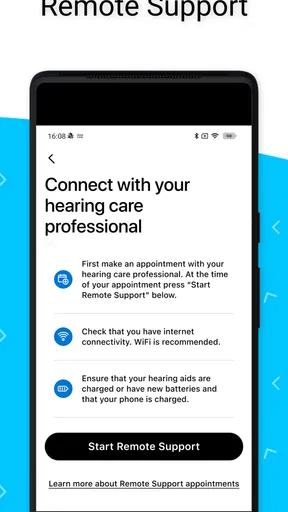
Many basic controls, once the hearing aids are paired, can generally be used through the phone’s Bluetooth connection without continuous internet access. However, downloads, updates, account-related services, support tools, or certain optional features may require connectivity. The app may also request permissions such as Bluetooth access and notifications. Review its current privacy policy and store listing to understand what data is collected and why.
